This guide walks you through Sepehr end to end on the Arbitrum Sepolia testnet. You will subscribe, open a small borrow position on Aave V3 from the Sepehr app, protect it, then push it below your threshold on purpose and watch the keeper rescue it.
Everything happens on a test network. The tokens have no value, nothing is real, you cannot lose anything. Never put a mainnet key or mainnet funds on this wallet.
Allow about 30 minutes. The screenshots come from a real run of this guide. To keep it offline, use Save as PDF at the top of sepehr.app/testnet.
In short:
- prepare your wallet: network, test ETH, test USDC (§1 to §3);
- subscribe to the Shield plan (§4);
- open an Aave position from the Sepehr app (§5);
- protect it (§6);
- push it under the threshold and watch the rescue (§7);
- stop everything (§8).
1. What you need
A browser wallet: MetaMask, Rabby or similar. A wallet kept for testing is best.
The Arbitrum Sepolia network. Most wallets add it on their own when the app asks. Otherwise, add it from chainlist.org/chain/421614, or by hand with these values:
Field Value Network name Arbitrum Sepolia RPC URL https://sepolia-rollup.arbitrum.io/rpcChain ID 421614Currency symbol ETH Block explorer https://sepolia.arbiscan.ioSome test ETH for gas: 0.01 ETH is plenty, since a transaction costs a few millionths of an ETH. Possible faucets:
- Alchemy, which asks for a small balance on Ethereum mainnet;
- Chainlink;
- or Sepolia ETH moved to Arbitrum Sepolia through the official bridge.
Test USDC: on faucet.circle.com, pick USDC, then Arbitrum Sepolia, paste your address and send. The faucet gives 20 USDC per request, once every 2 hours per address.
See your USDC in MetaMask. MetaMask does not list test tokens on its own: the faucet's USDC is in your wallet, but hidden. In the Tokens tab, choose Import tokens, paste the USDC address 0x75faf114eafb1BDbe2F0316DF893fd58CE46AA4d, check that the symbol is USDC with 6 decimals, then import.
2. How much USDC?
- The Shield plan costs 2.50 USDC per month on the testnet, half its mainnet price (4.99). The price on the Plan page is read from the contract: that one is authoritative.
- The Aave position in this guide uses 5 USDC. The testnet has no minimum amount.
One trip to the faucet (20 USDC) covers both, with room to spare.
3. Open the app
- Open the test app: app.sepehr.app. Announcements go out on the Telegram channel t.me/SepehrProtocol and on X @SepehrFi.
- Click Connect wallet, pick your wallet, and accept the switch to Arbitrum Sepolia.
The Positions page opens. On your first visit it shows a checklist of the four steps of this guide: plan, position, authorization, protection. It reads your progress from the chain, so you can leave and come back. If your wallet sits on another network, a banner offers Switch to Arbitrum Sepolia.
4. Subscribe to Shield
Click Plan in the top bar (
/app/plan).Leave billing on Monthly.
On the Shield card, click Choose Shield.
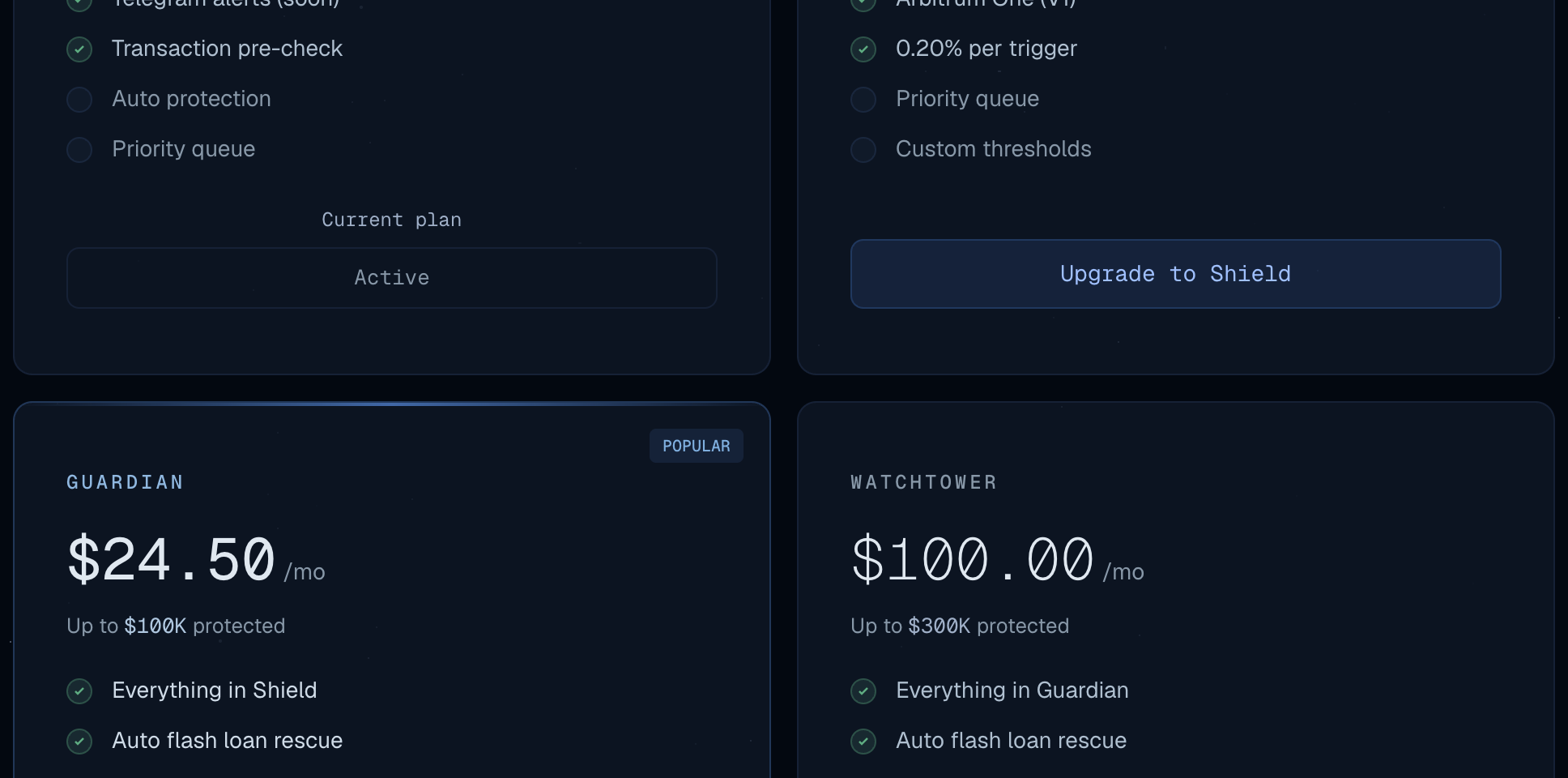
Your wallet asks for two confirmations, one after the other:
- the approval to spend the plan's price in USDC;
- the subscription itself (
subscribe).
Once both transactions confirm, the top bar shows Shield.
Invited to the closed beta? Your address may already hold the Titan plan, granted by the Sepehr team. The top bar then shows Titan: skip this step.
5. Open a position on Aave V3
Sepehr protects positions you hold on Aave. Aave's own app no longer offers Arbitrum Sepolia, so on the testnet you open the position from Sepehr, in the Test position card. The card talks directly to the Aave V3 pool that Sepehr protects (address in §11): the position you open is a real Aave position.
You will deposit 5 USDC, then borrow 2.50 USDC against them.
5.1 Supply 5 USDC
On the Positions page, find the Test position card: in the checklist's Open a test position step on your first visit, below your positions afterwards. The Supply tab is open.
Type
5in the amount field, then click Supply.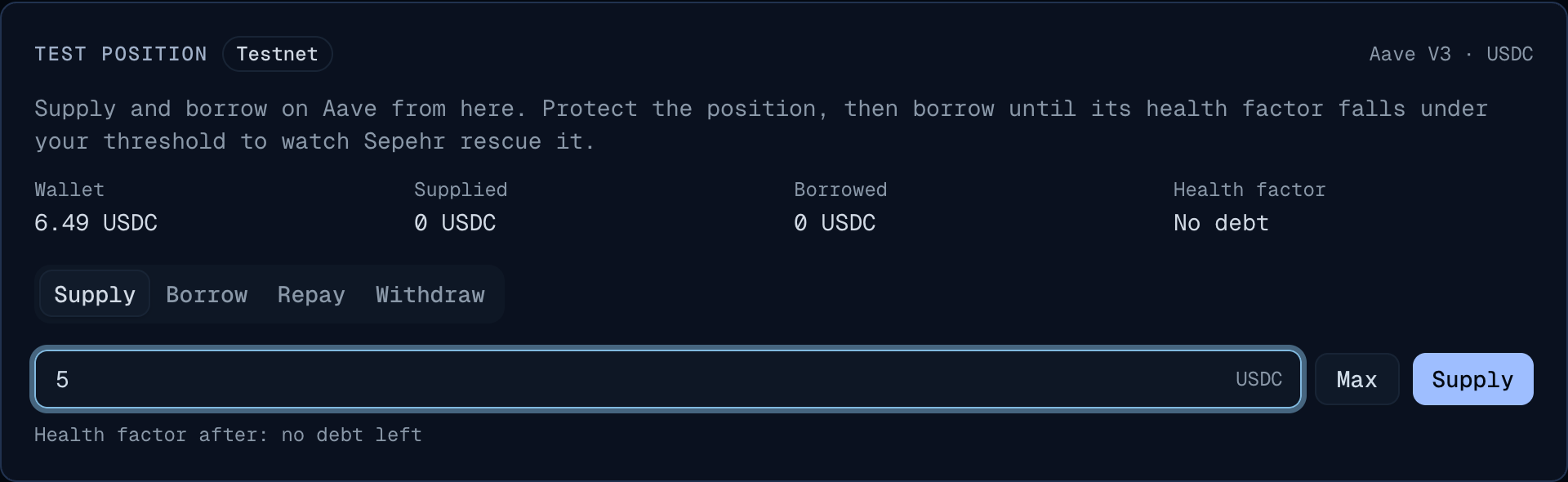
A window lists the two transactions of the deposit. Click Confirm.
- Allow Aave to take 5 USDC: the approval. MetaMask presents it as a spending cap request for USDC.
- Supply 5 USDC on Aave: the deposit itself.
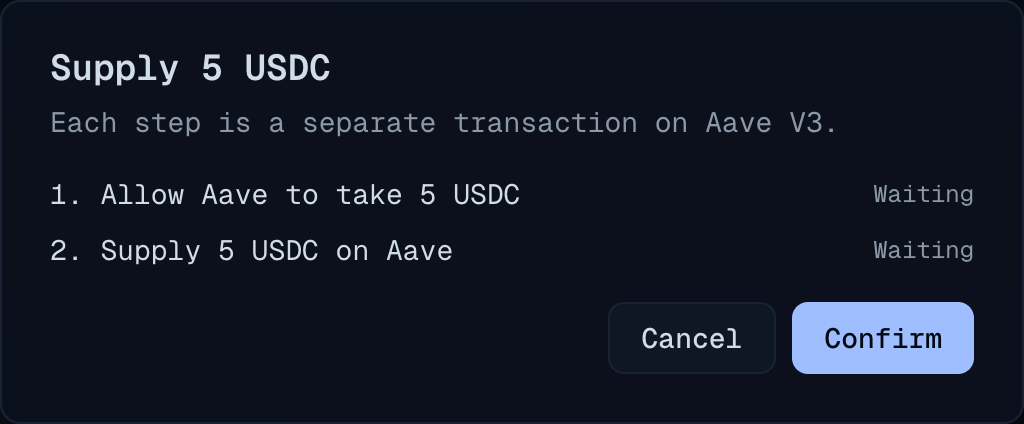
Confirm each one in your wallet. Each line turns to Done. Then click Close.
The card now shows Supplied: 5 USDC.
5.2 Borrow 2.50 USDC
Open the Borrow tab and type
2.5. Before anything is sent, the card shows the health factor the borrow leads to: 1.60.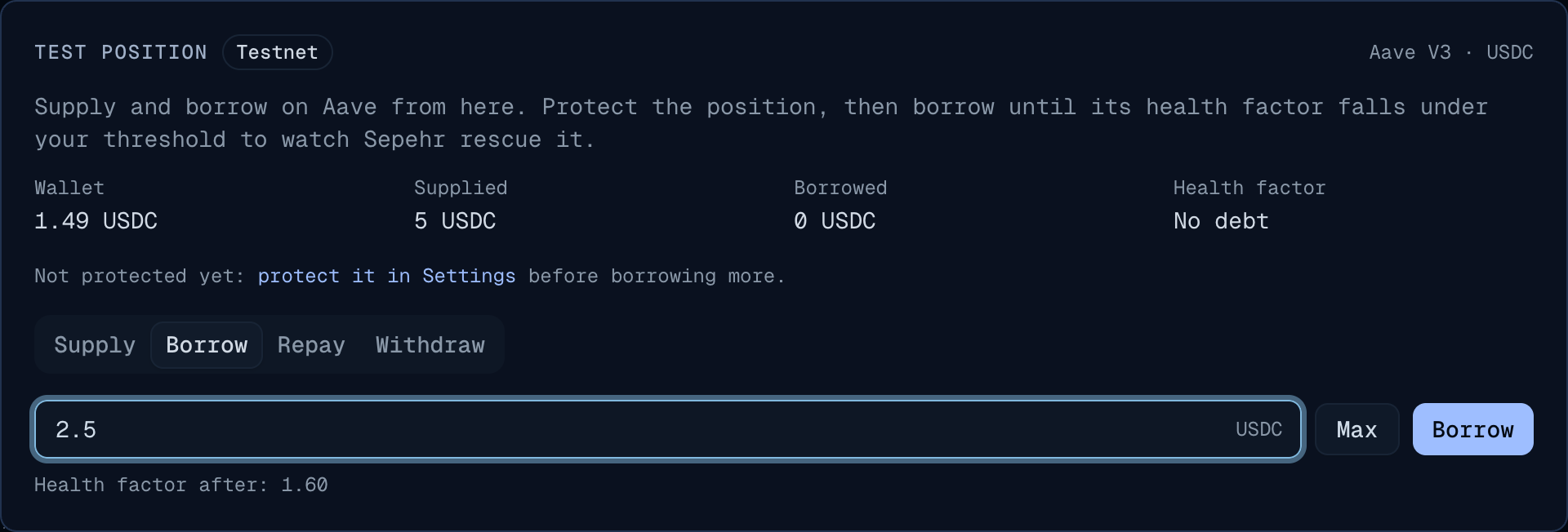
Click Borrow, then Confirm, then confirm in your wallet. This takes one transaction.
Your position now shows in the list: Aave V3, USDC / USDC, health factor 1.60, $5.00 of collateral, $2.50 of debt. Its Protect button means it is not protected yet: that is §6.
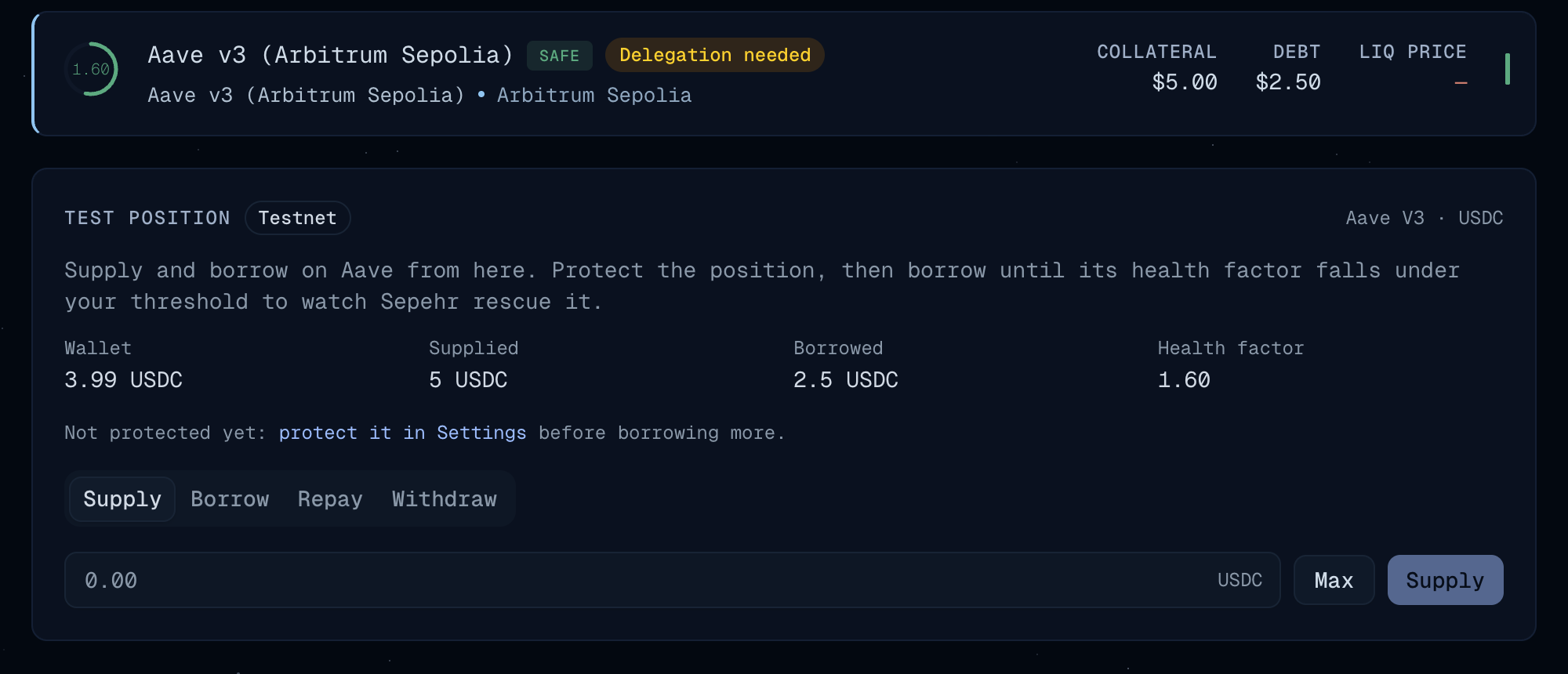
Every ? next to a word opens a short explanation of it, wherever it is in the app.
The health factor (HF) measures how far a position is from liquidation: Aave liquidates it below 1. On this market, USDC has an 80% liquidation threshold, so HF = 0.8 × deposit ÷ debt. Here, 0.8 × 5 ÷ 2.50 = 1.60.
The bar next to it, the health rail, shows where the position stands: liquidation at its left end, the rescue zone up to your threshold, the target band, and the health factor as a dot.
The card supplies and borrows USDC only, on purpose. On this testnet, Sepehr only rescues positions whose debt and collateral are the same token. Rescuing a mixed position (say WETH supplied, USDC borrowed) goes through a Uniswap swap, and the Uniswap router deployed on Arbitrum Sepolia lacks the interface Sepehr calls. On Arbitrum One, these rescues work.
6. Protect the position
Click Protect on your position's row (or in the checklist). A window opens with four steps at most; the ones already done are skipped.

Rule. The window shows when Sepehr steps in: below 1.20, back to 1.35 on Shield and Guardian. Watchtower and Titan choose their own, from Balanced, Cautious or Custom. Click Continue.
Authorize. The window says what your wallet will show: an approval of your aUSDC, the token Aave issued for your deposit, with no amount limit, which your wallet may warn about. That is expected: only the SepehrCore contract can use it, and only to rescue a protected position. Tick I understand…, click Authorize USDC, then confirm in your wallet.
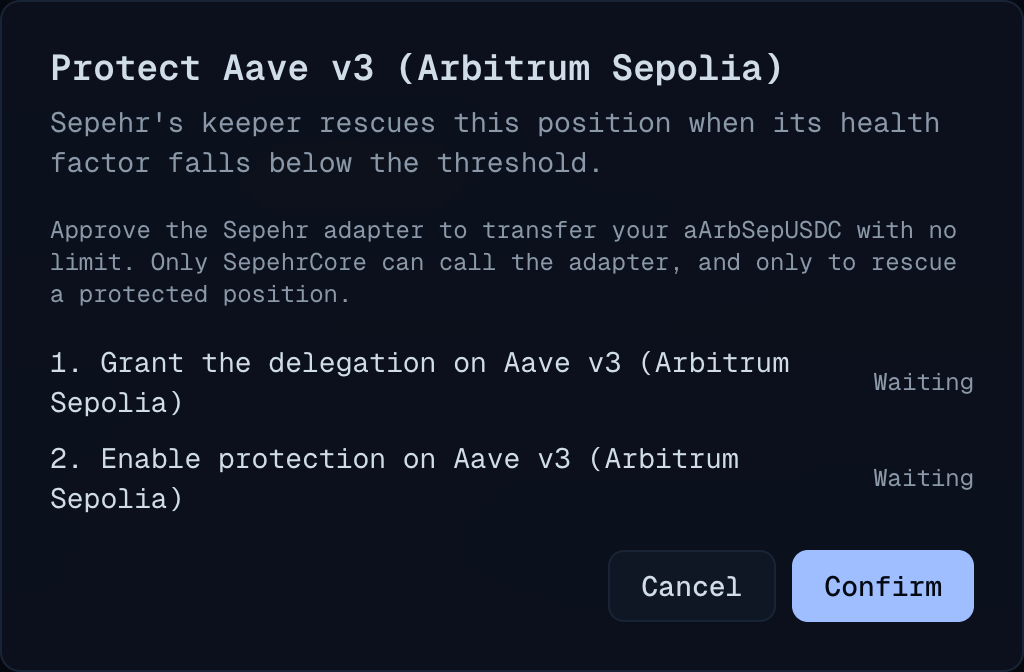
Wallet budget, optional: click Skip for now. §7.1 comes back to it.
Turn on. The window sums up the rule and the fee. Click Turn on protection, then confirm in your wallet.
The window says Aave V3 is protected, and the row turns to Protected. The keeper picks it up within seconds.
Click the row to open the position's page: its health factor and rail, the rule, When would Sepehr act? and What a rescue would do: how much debt a rescue would repay, from your wallet or your collateral, its fee, and the health factor it would leave (about 1.38: the keeper aims a little above the target, never under it).

Protection uses these settings:
| Setting | What it does | Shield and Guardian | Watchtower and Titan |
|---|---|---|---|
| Rescue below | Sepehr rescues the position below this health factor. | 1.20 | 1.20 to 2.00, your choice |
| Bring back to | The health factor a rescue brings the position back to. | 1.35 | from the threshold + 0.05 to 2.50 |
| Max price impact | The most a rescue's sale may lose against the oracle price. | 1% | up to 3% |
On Watchtower and Titan, Edit in the position's Rescue rule card changes them later.
Get alerts on Telegram. On the last step of Protect, or in Settings, Alerts card, click Open Telegram, then Start in the Sepehr alerts bot. It follows your wallet at once and messages you when a position nears its rescue threshold, when Sepehr rescues it, and if its protection stops working (missing authorization, plan about to end). Alerts are free for every protected position. Send /list to see the wallets you follow, and /stop to turn alerts off.
7. Trigger a rescue
Now push the health factor under 1.20 on purpose.
Back on Positions, Test position card, Borrow tab, type
1. The card shows Health factor after: 1.14 and warns that this is under your 1.20 protection threshold.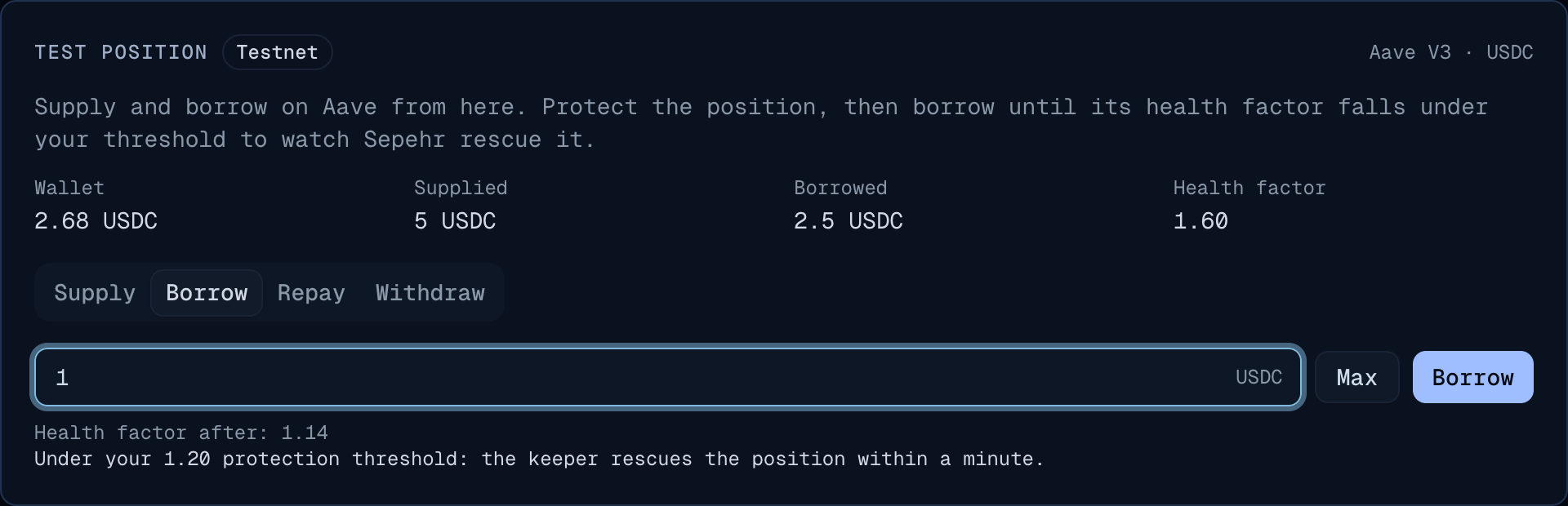
Click Borrow, then Confirm, then confirm in your wallet.
Wait. The keeper rereads a position close to its threshold every 2 seconds, and the others every 30 seconds: the rescue lands within 40 seconds of the borrow, and a few seconds after it when the position was already close to its threshold. It calls
SepehrCore.execute, which:- takes first the USDC your wallet budget allows (none until you set one, see below), then borrows the rest through a flash loan;
- repays just enough of your debt to bring the health factor back to your Rescue target (1.35 on Shield), never more than half of the debt;
- withdraws collateral, plus fees, to pay back the flash loan.
The page updates on its own within 30 seconds, or when you reload it. Your debt and your deposit went down, and the health factor climbed back to between 1.35 and 1.40. The row stays Protected.
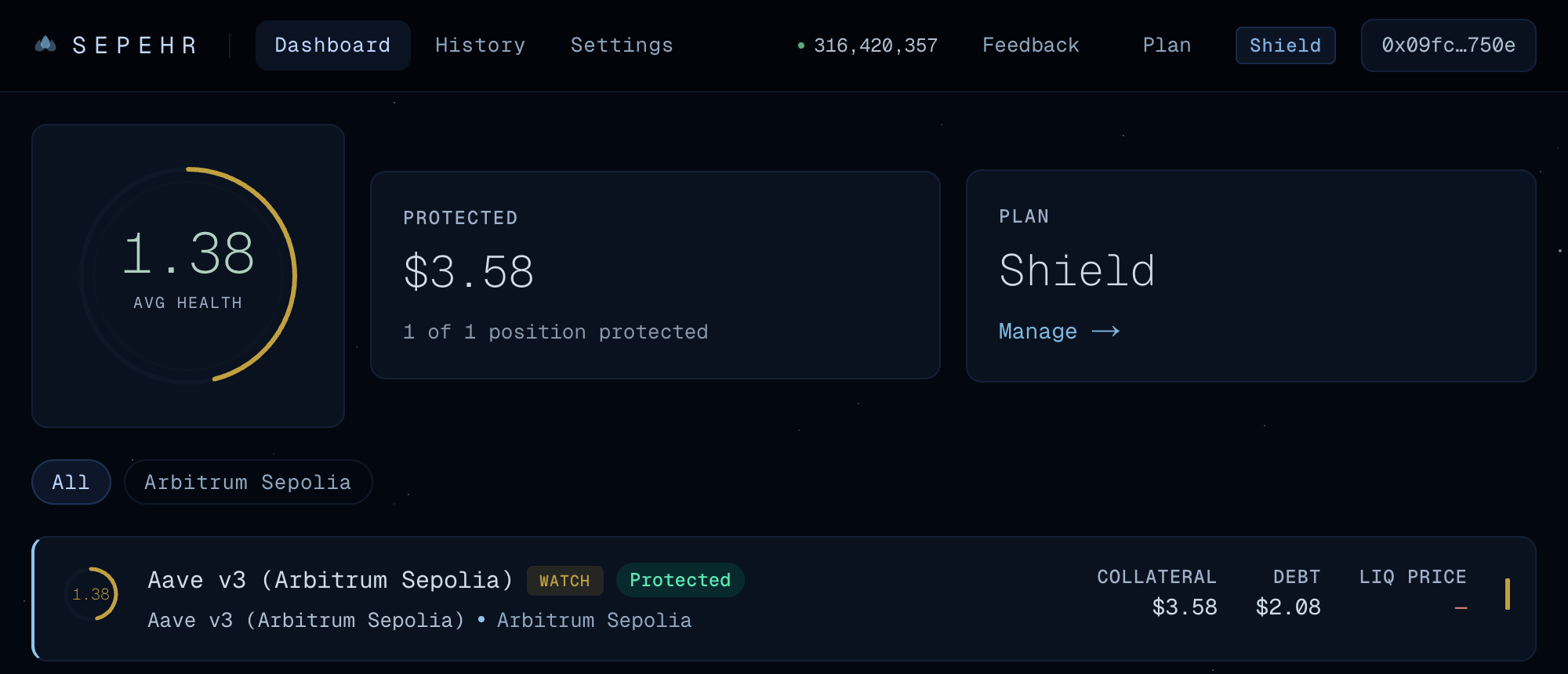
Click Activity in the top bar (
/app/activity). The rescue is listed with the health factor before and after it, the debt it repaid and its fee. View tx opens the transaction on Arbiscan.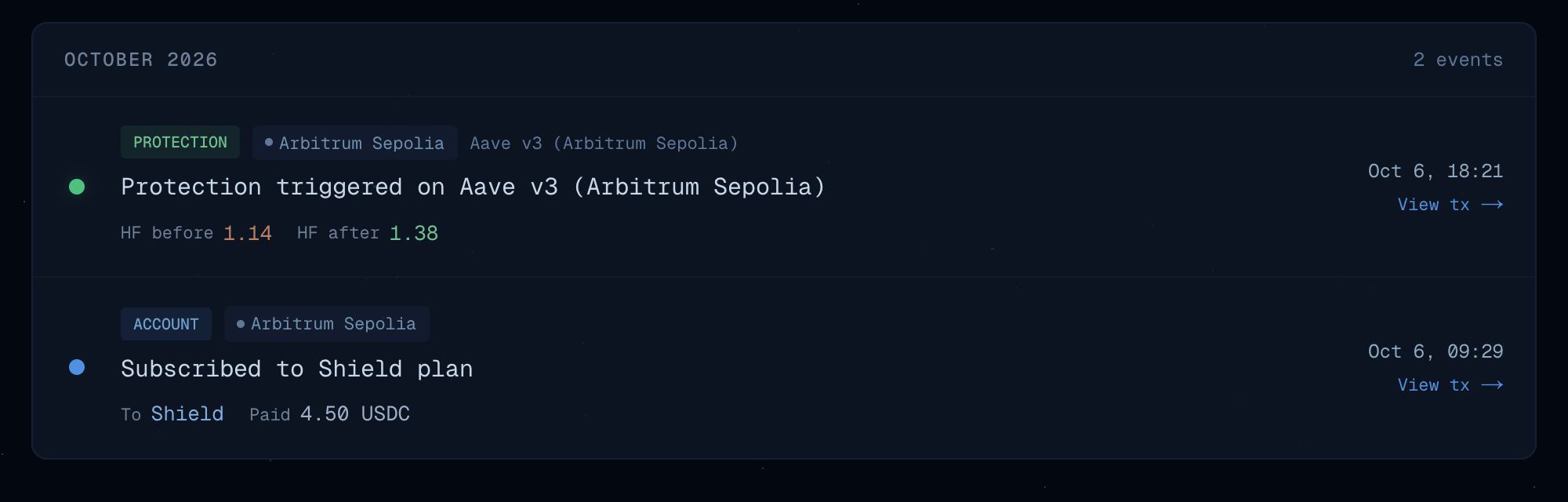
There is no waiting time between two rescues: whenever the position falls under its threshold again, the keeper steps in again. One rescue never repays more than half of the debt. After a fall so deep that half is not enough to climb back above the threshold, the keeper rescues the position again on its next check, until it is back above the threshold.
If you turned on Telegram alerts in §6, the bot messages you once the rescue is confirmed, with the health factor before and after and the link to the transaction.
7.1 A rescue paid from your wallet
A rescue can repay from your wallet instead of selling collateral: you set a budget, and the keeper uses it first.
- Open your position's page. In the Wallet budget card, click Change. It shows the USDC in your wallet.
- Type
5, click Set 5 USDC, then Confirm, and confirm the approval in your wallet. Sepehr may now take up to 5 USDC from your wallet, and only during a rescue: the repayment plus your plan's fee on it (0.20% on Shield). Remove budget sets it back to 0. - What a rescue would do now reads "…from your wallet budget, selling no collateral".
- Push the health factor under 1.20 again (Borrow tab, as above) and wait for the rescue.
- This time your deposit does not move: your debt went down, your wallet paid the repayment and its fee, and the health factor is back between 1.35 and 1.40. When the budget does not cover a whole rescue, the keeper uses it first and sells collateral for the rest.
Careful: on this market, USDC can be borrowed up to 77% of the deposit. The card's Max on the Borrow tab takes the HF to about 1.04. The rescue still happens: it repays half of the debt, the most one rescue may, and brings the HF to about 1.28, above the threshold but short of the target. Keep a margin so the test stays easy to follow.
8. Stop everything
On your position's page, click Turn off. Leave Also revoke the delegation on to also withdraw the permission given to the adapter: that adds one transaction.
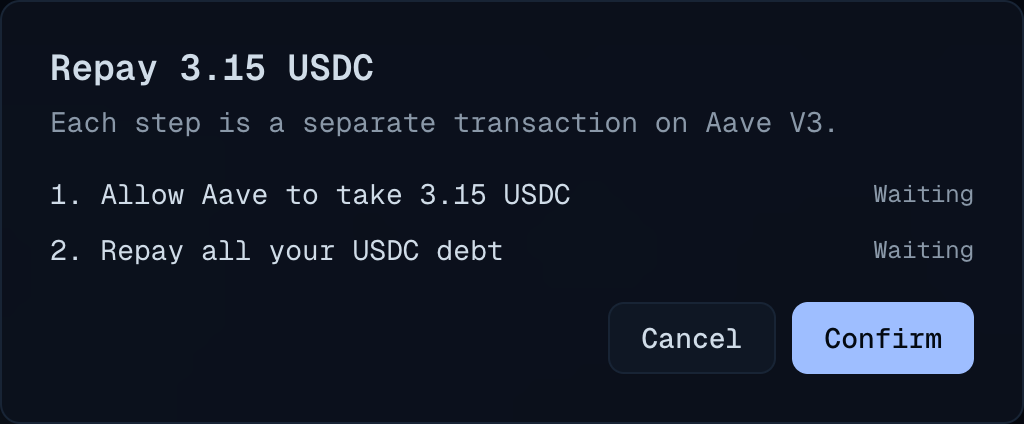
On Positions, Test position card, Repay tab: click Max, then Repay. The window asks for the approval, then repays the whole debt, interest included.
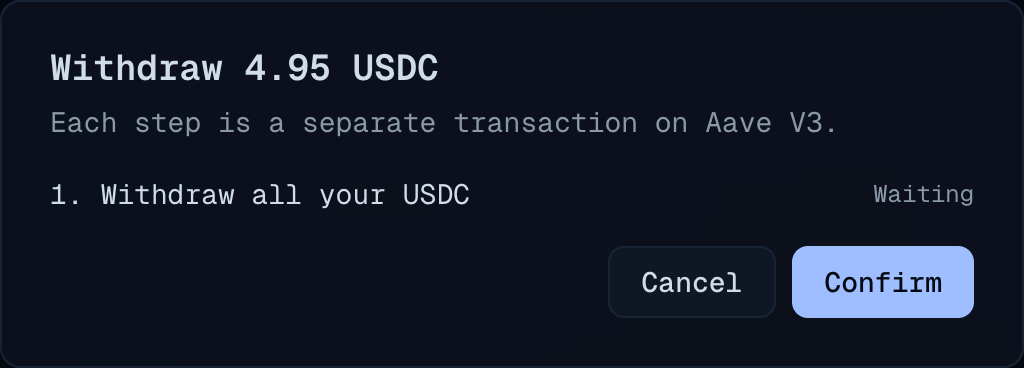
Withdraw tab: click Max, then Withdraw. Your USDC returns to your wallet.
To cancel the plan too, with a pro-rata refund: Plan page, Cancel plan, then type
CANCEL.
9. If something goes wrong
| What you see | What to do |
|---|---|
| Your wallet shows ETH but no USDC | Import the USDC token (§1). |
| The card says "Your wallet holds no USDC." | Get USDC from the faucet (§1). The card refreshes within 15 seconds. |
| A banner offers Switch to Arbitrum Sepolia | Click it, or switch networks in your wallet. |
| "At most … USDC." under the amount | Aave would refuse that amount. Lower it, or click Max. |
| "The network fee rose while the transaction was being sent. Nothing was sent: try again." | Send the step again. |
| A step shows Failed, with a message | The steps after it were not sent. Try again; if it fails again, report it (§10) with the message. |
| No rescue after 2 minutes | Check on Positions that the row shows Protected and a health factor under 1.20. If both are true, report it (§10): the keeper may be in maintenance. |
| "max fee per gas less than block base fee" in another app (an explorer, for example) | In MetaMask, edit the network fee: Advanced, max base fee 0.2 gwei. The Sepehr app sets the fee for you. |
10. Report a problem
Use Feedback in the app's top bar, or write to hello@sepehr.app. Include:
- your wallet address;
- the hash of the transaction involved, if any;
- a screenshot;
- your browser and wallet.
Do not report a security flaw in public: write to security@sepehr.app.
11. Testnet addresses
All on Arbitrum Sepolia, viewable on sepolia.arbiscan.io. The contracts' source code is public on GitHub.
| Contract | Address |
|---|---|
| SepehrCore | 0x362AA845dEBa9F7458996f4C89235a2a245F3c0C |
| SepehrSubscriptions (plans, where the plan's USDC goes) | 0xb8406EC69EAe5dB26EDFb67F62F92ef3245a4Cbe |
| Sepehr's Aave V3 adapter (the one that receives the delegation) | 0x255756AF613110529400bcaaDFc2b8D4008401b7 |
| USDC (Circle) | 0x75faf114eafb1BDbe2F0316DF893fd58CE46AA4d |
| aUSDC (aArbSepUSDC) | 0x460b97BD498E1157530AEb3086301d5225b91216 |
| Aave V3 Pool | 0xBfC91D59fdAA134A4ED45f7B584cAf96D7792Eff |
| Keeper | 0x33Db6eD6C6203967B090DeE9065eB8e1f7063C62 |
This testnet differs from the coming mainnet in a few ways:
- the admin timelock is 5 minutes instead of 48 hours;
- Sepehr's oracle prices are simulated;
- only Aave V3 is wired, since Compound V3 and Morpho Blue have no Arbitrum Sepolia deployment;
- positions are opened from the Sepehr app's Test position card, since Aave's app no longer offers Arbitrum Sepolia;
- a single keeper runs, operated by the Sepehr team: it may be stopped during maintenance.